
MAIMU
she is not pleased with your diskYour Mac is full. Maimu knows which 40 GB are safe to delete.
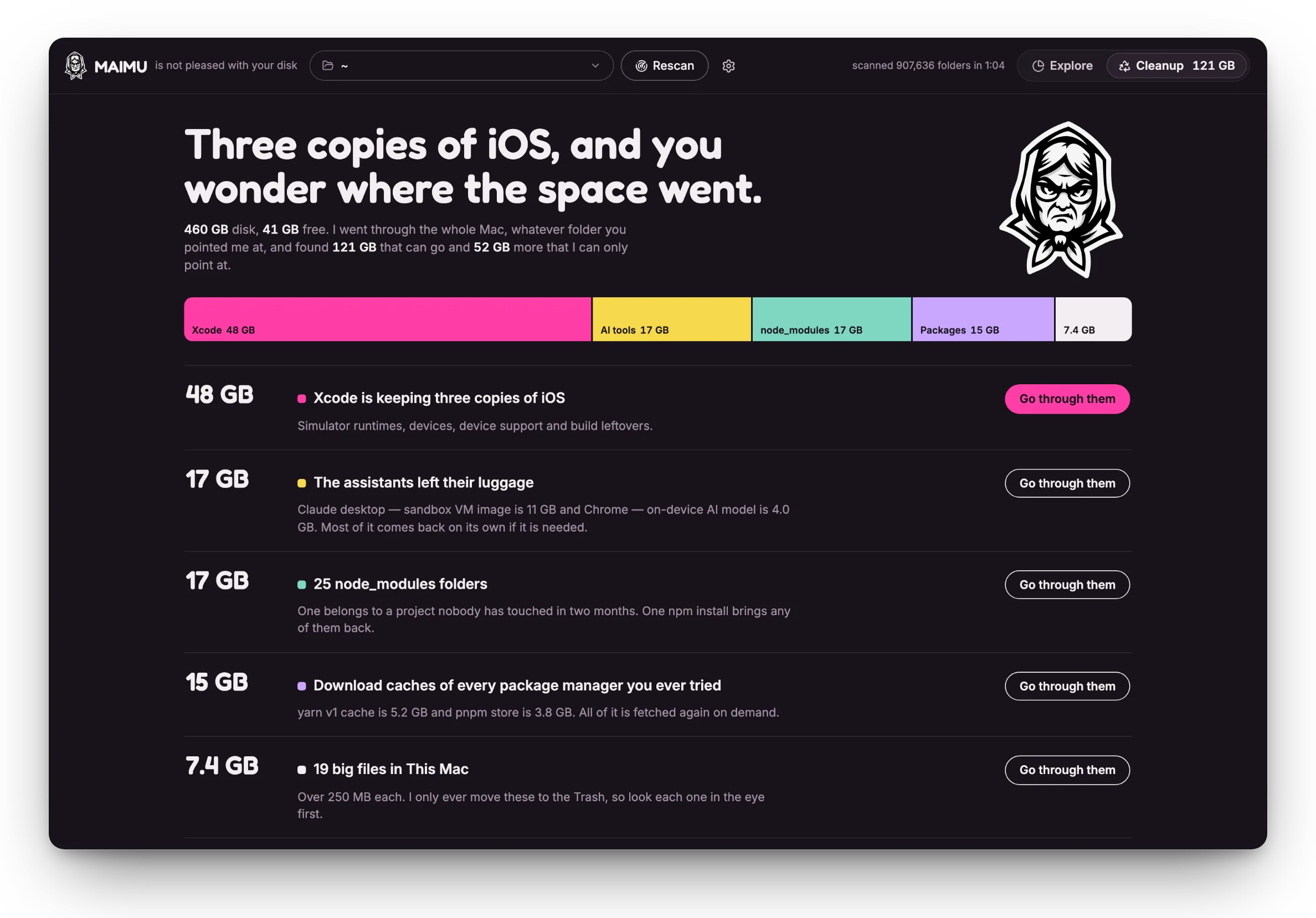
node_modules, build artifacts, caches, dead node versions — found, explained, and trashed, never nuked. One tiny binary for macOS.
- ~/Library/Application Support — 41 GB, 31.7%
- ~/Library/Developer — 30 GB, 22.9%
- ~/Library/Containers — 23 GB, 17.9%
- ~/Library/Caches — 17 GB, 13.1%
- ~/Library/pnpm — 9.9 GB, 7.6%
- ~/Library/Android — 5.4 GB, 4.1%
- ~/Library/Logs — 1.5 GB, 1.2%
- ~/Library/Group Containers — 1.3 GB, <0.1%
- ~/Library/everything else — 705 MB, <0.1%
v0.1.5 · signed & notarized by Apple · free to see everything · pro €9.99 / $9.99, pay once
the paranoid part is the product
A cleanup app you can let near your files
Disk cleaners earn distrust. MAIMU's answer is a short contract, enforced in code, not in marketing:
-
trash first
Deletes default to Move to Trash — instant, reversible. Files over 250 MB can only ever be trashed, never hard-deleted.
-
home only
MAIMU itself only ever removes files inside your home folder. Two named exceptions, both ticked by you: an app you uninstall goes to the Trash, and Xcode simulators, Docker and Homebrew leftovers are removed by their own tools, for good. External volumes are read-only territory.
-
only what she found
It can only delete paths it surfaced and you confirmed — there is no free-form delete anywhere in the app.
-
local, silent
No telemetry, no account, no cloud. Everything runs on your Mac; nothing about your disk ever leaves it.
-
logged
Every deletion is written to a local log you can read — what, when, and how much it reclaimed.
the usual suspects
Where your gigabytes actually went
Every row is real — measured by MAIMU on the developer's own Mac. Yours will be worse.
who she cleans for
Made for the Macs that fill themselves
Developers
38 node_modules under one ~/dev, Docker.raw at 20 GB, DerivedData forever — with git-aware staleness.
for developers →
IT teams
The "my disk is full" ticket, closed by the user — trash-only, home-only, and a deletion log for the ticket.
for it teams →
Video editors
Old exports and forgotten renders on the same disk you boot from — every file over 250 MB, surfaced.
for video editors →
256 GB Macs
The 131 GB Library hiding behind "System Data" — mapped ring by ring on the SSD you can't upgrade.
for small SSDs →
no subscription. it's a feature.
See everything free. Pay once to clean.
Free
$0
- Full disk scan & zoomable sunburst
- Explore every folder, table view included
- All the findings, by name — simulators, AI leftovers, node_modules, caches, big files
- Reveal anything in Finder
Pro
€9.99 / $9.99 · pay once · your currency at checkout
- Everything in Free
- The cleanup brain: trash what she found
- Empty Trash from the app
- Yours forever — no renewal, no account
pay once, own it — not a subscription
Buy ProVolume
€9.99 / $9.99 · per seat · 10+ seats
- Everything in Pro, for everyone on the team
- One key per person, to the addresses you give us
- Invoiced to your company — PO reference welcome
- Tell us the seat count and we quote the batch
fair questions
FAQ
Why isn't this in the Mac App Store?
The App Store sandbox and a whole-disk cleanup tool are a poor fit — MAIMU needs to see your real folders to be useful. It ships as a signed and notarized download from this page instead, with its checksum printed right next to the link.
What is it, technically?
A native macOS app — Go backend, Vue front — that ships as one small binary. No Electron, no background agents, no launch daemons.
Does it phone home?
No. No telemetry, no analytics, no account. The only log it writes is the local deletion log on your own disk. The single network request it ever makes is fetching version.json from this site to learn if a newer version exists — a static file, nothing about you in it. Details in the privacy policy.
How is this different from a disk-space visualizer?
Visualizers show you the map. MAIMU also knows which territory is safe to reclaim — that node_modules nobody touched since March is different from your photo library, and she treats them differently.
Lost your license key?
maimu.app/license re-sends it to the e-mail you paid with — the key is deterministic, so it's the same one forever. It also arrives by e-mail right after purchase.
How do I verify the download?
The DMG is signed with our Apple Developer ID and notarized by Apple — Gatekeeper checks that for you on first open. If you like verifying by hand, the SHA-256 is:
2f98e579bbd566ba134f7dd32033eaeb45105c279536a8cfe2d6936cc6c662e1
shasum -a 256 ~/Downloads/MAIMU-v0.1.5.dmg