Can you upgrade a MacBook's SSD? No — here's what Apple charges instead
Short answer: no. On every Apple Silicon Mac the storage is soldered to the logic board. The capacity you pick at checkout is the capacity that machine has until you sell it — no slot, no upgrade path, no adding a drive later.
Which means the price you pay for storage on the day you buy is the only price you will ever get to pay for it. So it is worth knowing what that price is.
What Apple charges to go one step up
Read live from the apple.com US store configurators on 15 August 2026 — US store, in USD. Storage pricing changes and differs by region, so treat this as a snapshot and check the configurator before you quote it back to anyone.
| Step up | What Apple charges |
|---|---|
| 512 GB → 1 TB | $300 |
| 1 TB → 2 TB | $500 |
| 2 TB → 4 TB | $1,000 |
| 4 TB → 8 TB | $2,000 |
The striking part is how consistent that ladder is. The MacBook Air 13", the MacBook Pro 14" and the Mac mini all price the same steps identically — the Air shows it as −$300 to drop to 512 GB from a 1 TB base, the Mac mini as +$300/+$800/+$1,800/+$3,800 stacked above a 512 GB base, the MacBook Pro as +$1,000 to go 2 TB → 4 TB. Re-anchor them and it is one ladder, doubling at every rung.
The number that matters most is the first one. The cheapest storage upgrade Apple sells is $300 — and on a base-model machine it is exactly the one most people skipped, because at checkout it looked like the optional extra rather than the decision.
Two answers, and only two
Once the disk is full, "buy a bigger one" is not on the table for this Mac. What is left:
- Pay for it at the next Mac. $300 minimum, on a purchase you may not have planned, to solve a problem you have today.
- Get back the space you already paid for. Free, immediate, and — this is the part people underestimate — usually a much bigger number than they expect.
Option 2 is not glamorous, and it comes with an honest limit I want to state before anything else: reclaiming space is not the same as owning a bigger disk. If you genuinely need 2 TB of video on the machine at all times, no cleanup tool invents 2 TB. What cleanup does is answer a different and much more common situation — the disk is full of things you would not keep if you could see them.
The space is almost never where people look
Open Storage settings on a full Mac and most of the missing capacity is filed under System Data, a bucket macOS declines to itemise. It is the single most reinstall-inducing screen Apple ships.
On one real Mac — mine, the machine this app was built on — ~/Library alone came to 131 GB:
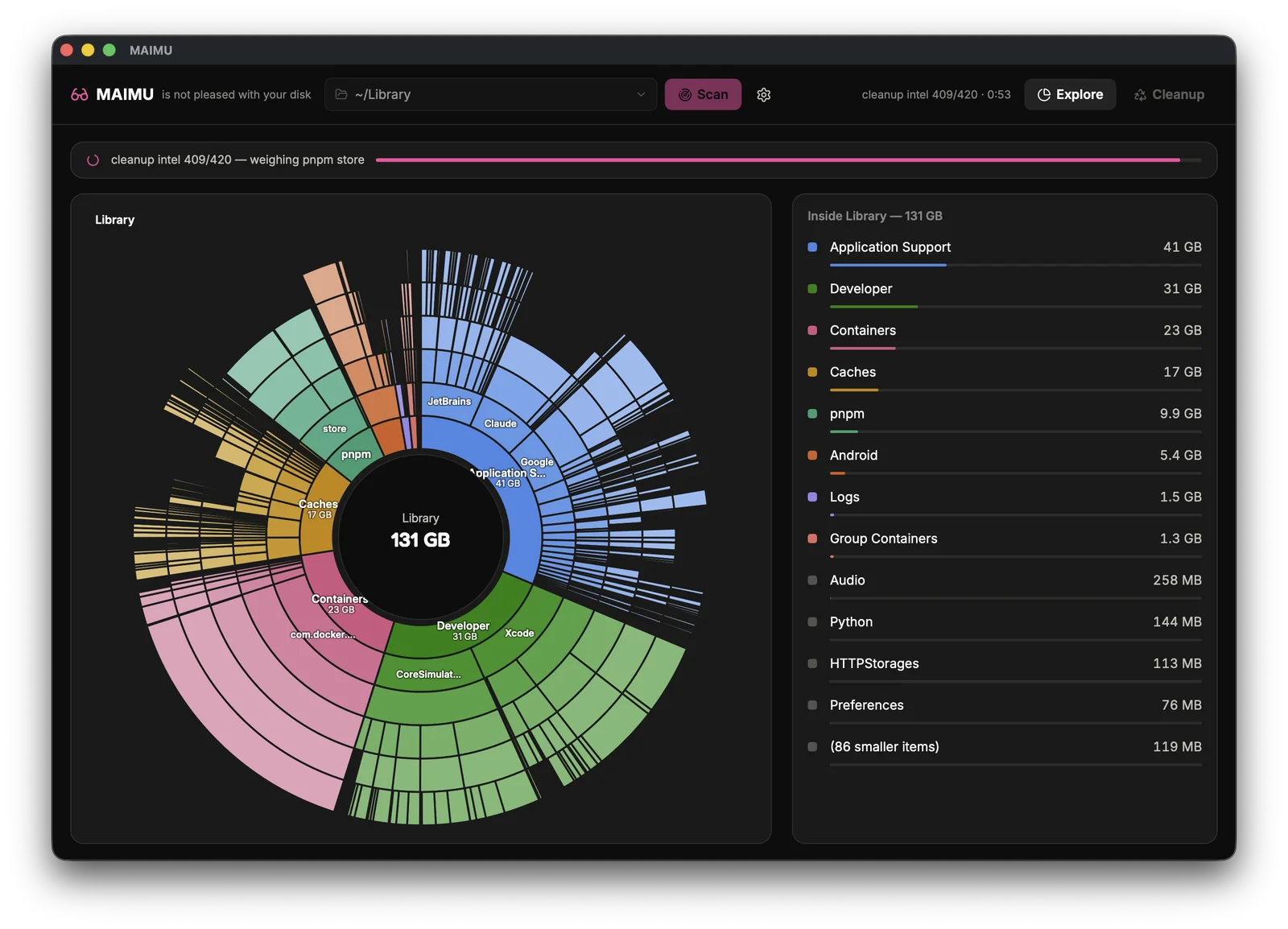
- 41 GB of Application Support — where apps park everything, including VMs, models and bundles belonging to apps deleted a year ago
- 23 GB of Containers — sandboxed apps each get a private box, and the boxes stay after the apps go
- 17 GB of Caches — the self-regrowing kind, which exist precisely to be rebuilt
None of that appears in Finder by default. All of it counts against the capacity you chose at checkout.
If you write software on the machine the numbers get sillier, and I wrote the whole map up separately: where your Mac's disk actually went — node_modules per abandoned checkout, Xcode's four separate directories, a package cache per tool that has ever wanted one.
What I built, and what it costs
MAIMU is a Mac app that scans the disk, draws that sunburst, and then does the part that actually took the work: tells you which of those gigabytes are safe to delete, and why, before you touch anything.
Seeing everything is free — the full scan, the whole map, every finding, the table view, no payment and no account. The one-time license unlocks the deletion itself: $9.99 / €9.99, paid once, not a subscription.
So the comparison the title is really about:
- Apple's cheapest storage step: $300, decided once, at purchase, unrepeatable
- MAIMU: $9.99, about 3% of that step, and it runs on the Mac you already have
I am not going to pretend those are the same product. One gives you more disk; the other gives you back the disk you are not using. But if you have never actually looked at where 131 GB went, you do not yet know which problem you have — and finding out costs nothing.
Why you can let it near your files
A cleanup app is asking a stranger for a lot of trust, so MAIMU's safety rules live in code rather than in marketing copy:
- It only ever deletes paths it surfaced itself and you confirmed. There is no free-form delete anywhere in the app — not even a text field where a path could be typed.
- It refuses to touch anything outside your home folder. External volumes are explorable, never deletable.
- Deleting means Move to Trash — instantly reversible. Permanent delete is opt-in per action, and anything over 250 MB can only ever be trashed, whatever you click.
- Every deletion is appended to a local log — what, when, how much — as plain JSON in
~/Library/Application Support/MAIMU/, yours to read. - Nothing leaves the machine. No account, no telemetry, no cloud; the app's own server binds to
127.0.0.1and talks to nobody. - The Node version you are actually running is protected and never offered up. Neither is anything under
.git.
For node_modules specifically, it does not trust file timestamps to decide what is dead — a branch switch or an editor indexing pass touches mtime without you having worked on anything. It asks git when you last committed to that project instead, which is the question you actually meant.
The longer version of that reasoning is here: why MAIMU moves things to the Trash instead of deleting them.
Where to start
If you bought a base-model Mac and live at 95% full, start here: MAIMU for 256 GB Macs — the invisible ~/Library, mapped.
If your disk is full of build output and dependency trees: MAIMU for developers.
And whichever you are: the scan is free, and it will tell you in about a minute whether your next $300 is genuinely necessary or merely convenient for Apple.